What Is Coupon Stacking? Rules, Math and Margin Risks
What is coupon stacking? Learn how two discounts combine, when retailers allow it, how checkout calculates it and how stacked offers affect margins.
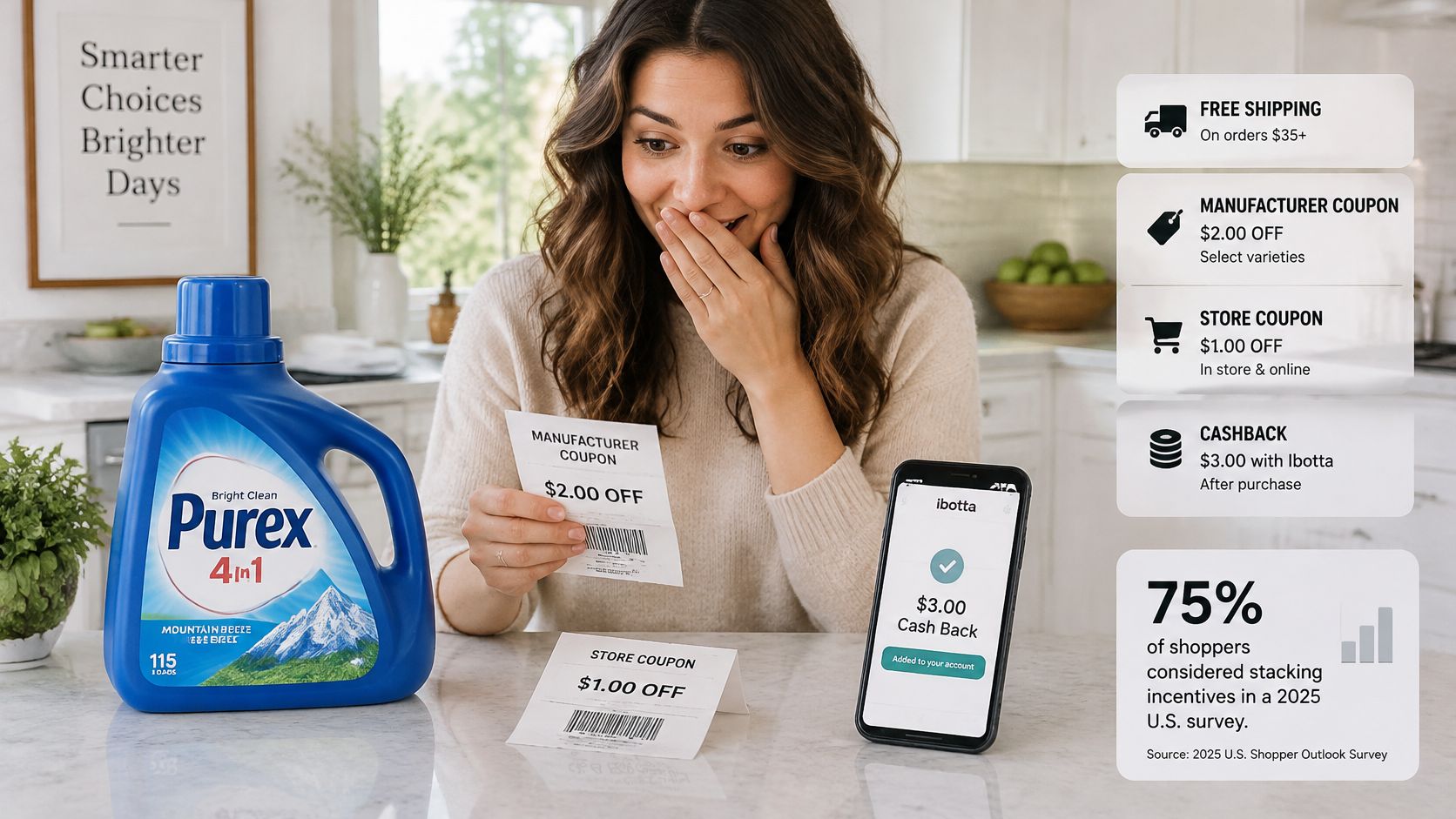
Coupon stacking means applying two or more eligible discounts to the same purchase, most often one manufacturer coupon combined with one retailer-issued coupon, and it only works when the retailer's terms allow both. On a $6 item, a $2 manufacturer coupon and a $1 store coupon bring the price to $3, a 50% cut before tax.
You're in an aisle, or you've got a cart open in another tab, holding two offers for the same product. One came from the brand. One came from the store. The obvious question is whether both count at once, and the answer has almost nothing to do with arithmetic.
Most explanations of what coupon stacking is stop at "combine two codes and save more." That framing collapses the first time a second code fails at checkout, or when a $10 saving turns into a $22 hole in a merchant's margin. Discounts are contracts with a funder, a scope and a priority order. Once you see them that way, the confusing cases become predictable.
What Coupon Stacking Means in One Sentence
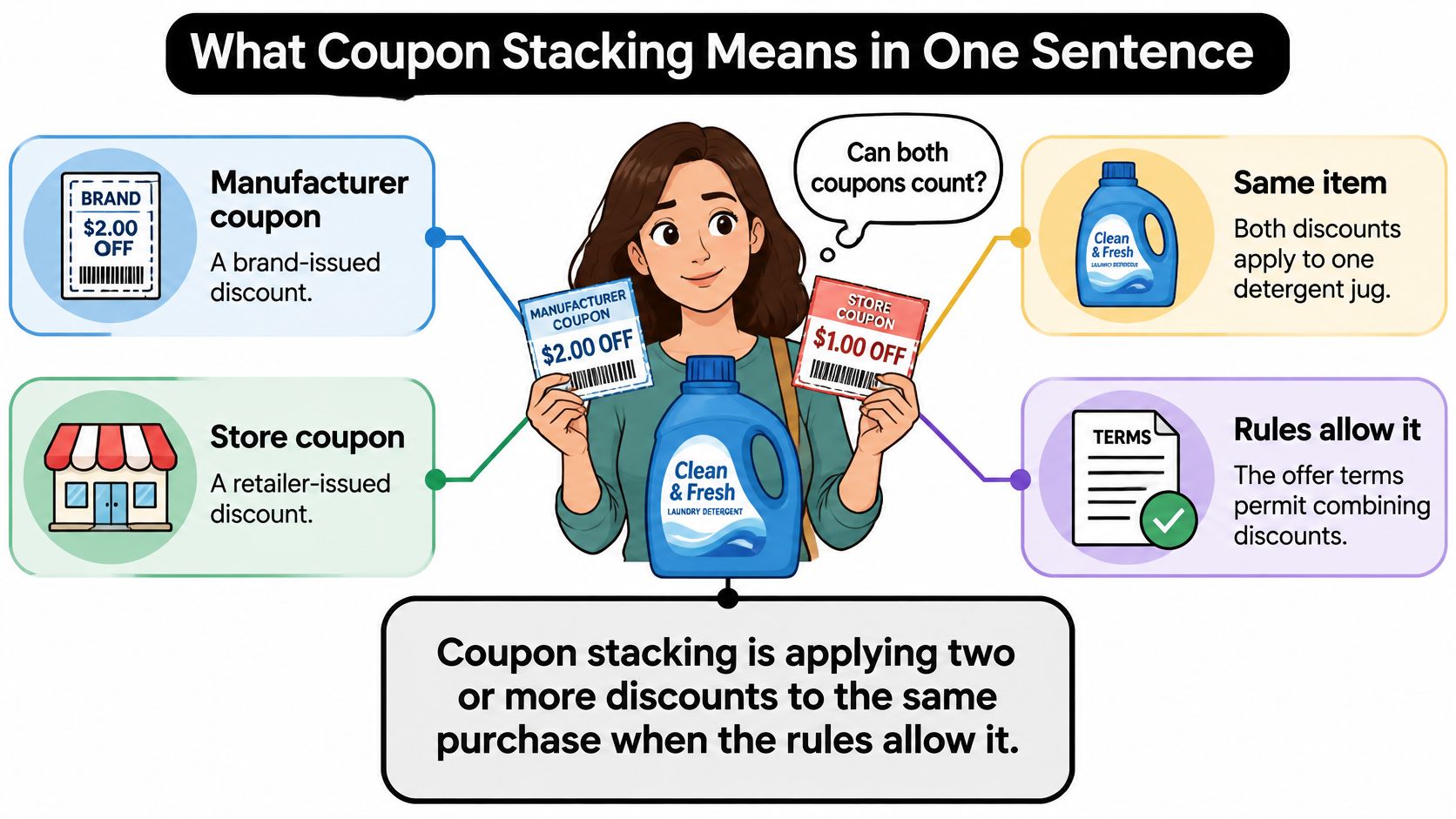
A shopper picks up a jug of detergent. In one hand is a coupon the brand mailed out. In the other is a coupon the store printed in its own flyer. Both say they're good for that jug, and the shopper wants to know whether both can count.
Coupon stacking is the practice of applying two or more eligible discounts to the same purchase, most commonly one manufacturer coupon combined with one retailer-issued coupon, as explained in Couponzania's breakdown of manufacturer coupons. The distinction matters because the offers come from different parties. A manufacturer coupon is funded or reimbursed by the brand. A store coupon is funded by the retailer.
On a $6 product, a $2 manufacturer coupon plus a $1 store coupon lands the price at $3, a 50% reduction before taxes or other rewards.
Think of it as two separate wallets paying one bill. The brand's wallet covers its $2 and the store's wallet covers its $1. Neither wallet is asked to pay twice, so a retailer that permits stacking can apply both to one item instead of treating them as rival versions of the same offer. That's the easy part. The hard part is contractual, because retailers define eligibility, product categories, quantity limits, expiration rules and whether digital and paper offers can combine.
Three questions to ask about any stack
- Who funds each discount? If both offers are brand-funded, a store may treat the second one as a duplicate rather than a companion.
- Does the written policy allow both? Store terms, not the coupon's own wording, decide whether layers combine on one item.
- Will the checkout accept both codes on the same item? A policy can allow it and the software can still reject it, which is the gap most shoppers discover the hard way.
Practical rule: Read the offer terms for the funder, then read the store's discount policy for the permission. If either one is silent on combining, assume the stack won't survive checkout.
How the Math Adds Up on Real Prices
Two codes on one cart don't hand you their sum. The checkout applies each discount to a base that a previous discount has already changed, or to the original price, depending on how the merchant configured it. That one decision moves the final number.
Start with the simplest case, the detergent jug at $6 with a $2 brand coupon and a $1 store coupon. Both apply to the same item and the price falls to $3. Nothing compounds, because neither discount is a percentage.
Percentages change the picture completely. Take a $100 order with a 20% code and a $10 code. Apply the percentage first and the cart drops to $80, then the fixed $10 takes it to $70. Run the same two codes the other way and $100 minus $10 is $90, with 20% off that at $72. Same cart, same codes, $2 apart.
Then there's shipping, which lives on a different line entirely. A $50 order with a 10% code and free shipping, where delivery would have cost $8, becomes $45 for the goods and $0 for delivery. The customer pays $45 instead of $58. The percentage was worth $5. The waived shipping was worth $8.
| Scenario | Discounts applied | Final price |
|---|---|---|
| Manufacturer plus store coupon | $2 manufacturer coupon + $1 store coupon on a $6 product | $3 (50% off) |
| Percentage first, then fixed amount | 20% off, then $10 off on a $100 order | $70 |
| Fixed amount first, then percentage | $10 off, then 20% off on a $100 order | $72 |
| Percentage discount with free shipping | 10% off plus free shipping on a $50 order with an $8 shipping fee | $45 total (down from $58) |
What to do with this before you buy
Run your own cart twice, once with each calculation order, and see which total the checkout displays. If the number on screen matches neither of your workings, the store is calculating from the original price, applying a priority rule, or dropping one code. Screenshot the cart breakdown before you pay, because the applied discount list is the only reliable record of which codes counted.
A stacked deal is only as generous as its order of calculation and the items it's allowed to touch.
Retailer Rules That Decide Whether Codes Combine
Stacking creates a control problem because "multiple discounts" can mean permitted composition or two offers fighting over the same item. Guidance from the Food Marketing Institute's digital coupon guidelines defines manufacturer-coupon stacking as using multiple manufacturer coupons from different media, such as paper and digital, and recommends that retailers enforce those conflicts systemically in point-of-sale or loyalty systems rather than leaving the decision to a cashier.
Its baseline control is one manufacturer coupon, in any form, per common item. When several offers qualify, the system needs a priority rule: paper first, digital first, or highest value first. That order is a business decision, not a technical detail, because it decides which discount the store absorbs and which one the brand reimburses.
The six controls in plain language
| Control | What it limits | Typical setting |
|---|---|---|
| Issuer rule | Manufacturer offers on one item | One manufacturer coupon per common item, in any form |
| Priority rule | Which offer wins when several qualify | Paper-first, digital-first or highest-value-first |
| Combinability flag | Whether a code can share a cart with other codes | Yes or no for each discount |
| Usage limit | How often a code can be redeemed | Per order, per customer or total redemptions |
| Expiration date | How long a code stays valid | Fixed end date for each campaign |
| Scope | Which products or customers qualify | Specific products, categories or customer groups |
Read the table as a list of decisions somebody already made on your behalf. A coffee brand that flags its 15% code as non-combinable has decided that code can't ride alongside a free-shipping offer, regardless of what the checkout field seems to accept. A grocery chain that sets one manufacturer coupon per item in any form is telling you the paper coupon in your hand disqualifies the digital clip in your app for that same box.
For shoppers, the sequence is short. Confirm who issued each code, look for the word "combinable" or its absence in the terms, scan for per-item and per-order limits, and check the end date on both offers. If any of those is unclear, treat the stack as unproven until the cart shows both discounts applied. Merchants working through the same rules day to day will find the coupon operations write-ups on the KeepCart blog useful for the edge cases.
How Shopify Orders Discounts at Checkout
Shopify is the clearest public example of how a checkout sequences discounts. It sorts every promotion into three classes, and the class decides when the discount lands.
Product discounts reduce specific items. Order discounts reduce the cart total. Shipping discounts reduce delivery charges. Product discounts apply first, order discounts apply next to the reduced subtotal, and shipping discounts apply last. Combination is only allowed when the relevant combination settings are switched on, per Shopify's documentation on discount combinations.
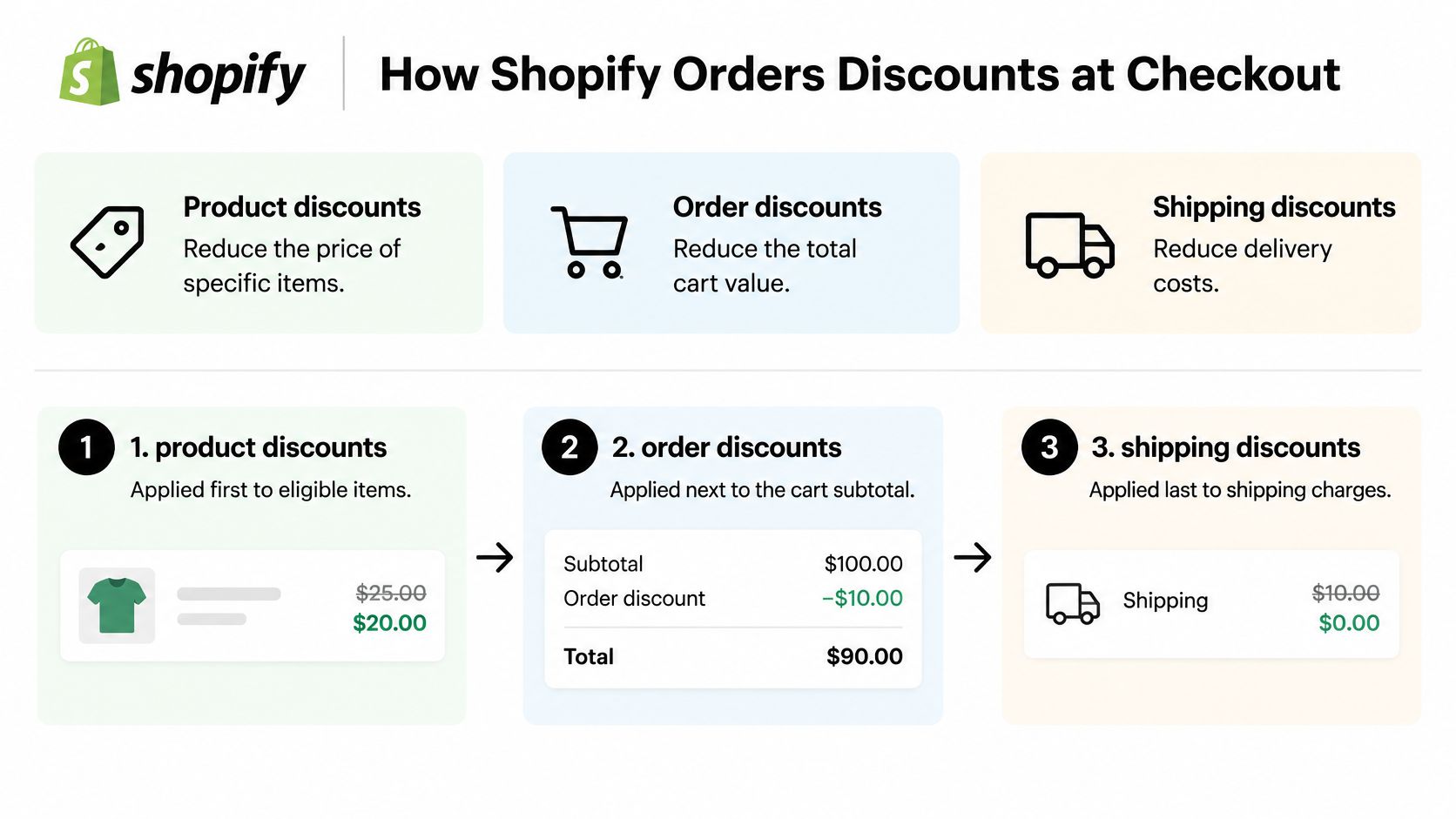
The same documentation sets the ceiling: a customer can enter up to five product or order codes and one shipping code. Multiple discounts generally cannot apply to the same item unless they belong to different classes or the store has added specific functionality to permit it.
Why the checkout ignores the order you typed
Here's where shoppers get lost. When discounts can't combine, the platform selects the best eligible combination for the cart. The result can differ from the order the codes were entered, so a shopper who types the 20% code first may watch a smaller fixed discount win because it produced the lower total.
The contrarian point follows. Switching on more stacking does not automatically make an offer more generous. Eligibility and cart conditions decide what applies, and a store that enables everything can still produce a higher final price than one with tight, deliberate rules.
Diagnostic question: when a second code fails, ask which discount class it belongs to and which cart condition blocks it. Product exclusions, minimum spends, customer limits, geography, currency and one-use restrictions are the usual culprits.
The Margin Cost Most Shoppers Never See
Shoppers have learned to expect layers. In 2025, 91% of 1,011 U.S. adults surveyed by Savings.com said they regularly sought coupons or discount codes online or in stores. And 75% of shoppers considered stacking incentives such as free shipping, coupons and cashback important to purchase decisions in 2025, according to Mass Market Retailers. Layered offers are now part of what deal quality means, not a loophole people brag about.
The merchant view is less comfortable. A discount can be perfectly valid for the shopper and commercially unintended for the retailer. A public code combines with a referral benefit or free shipping, the effective discount grows past what finance approved, and commission gets paid on a sale the intended partner never generated. Shopify's native controls cover usage limits, customer-specific restrictions, combination settings and that five-code ceiling, but those govern configured discounts, not every externally circulated code layered around checkout.
Where the money actually leaks
| Source | How it stacks | Margin effect |
|---|---|---|
| Public promo code | Combines with free shipping or a referral benefit | Larger effective discount than planned |
| Browser coupon extension | Injects a code at checkout | Commission paid on a sale the partner did not generate |
| Loyalty credit | Layers on top of a sale price | Discount deeper than the planned floor |
| Cashback offer | Adds a rebate outside the checkout | Lower net revenue per order |
| Referral code used beyond its campaign | Redeemed by customers outside the target group | Discount spreads to unintended buyers |
The trade-off is real in both directions. Stacking lifts conversion and perceived value, and it gives loyal customers a checkout that feels like a win. Uncontrolled stacking erodes margin, muddies attribution and destroys the exclusivity of an offer you promised a partner.
The question worth planning around isn't "can these codes stack" but "which incentives should stack, for whom, in which market, and at what financial cost."
How Leaked Codes Make Stacking Worse
Stacking risk usually starts upstream of the cart, with a single code that was never meant to travel. A risk assessment cited by Brandrocket, drawing on Seguno data covering roughly 26,000 stores and 117 million coupon codes, found that 98% of codes had either a very long expiration period or none at all, roughly three-quarters had no product restrictions, and more than two-thirds had no restriction on which customers could redeem them.
Each gap is a different escape route. Long validity lets a code outlive the campaign it was built for and stay available when a newer promotion launches beside it. Unrestricted products let a discount built for one SKU apply across the catalogue. Unrestricted customers let anyone holding the code redeem it, including people well outside the audience it was written for.
The pressure is increasing. Online coupon use in the United States rose 13.7% in 2024, based on Coupon Science's analysis of 1.2 billion redemptions across more than 50 ecommerce platforms. More codes circulating means more chances for one to surface on a deal forum with no restrictions attached.
A short audit that finds the problem
- List every active code with its end date. Any code with no end date is already a candidate for removal.
- Check product and customer limits. No scope means the discount applies to everything and everyone.
- Search coupon sites and forums for codes that were never public. Compare what you find against your intended audience.
- Retire or tighten any code that can combine with another live offer. Two individually sensible codes can still produce an unplanned total.
The stack that hurts a margin rarely begins at checkout. It begins with a code someone shared, and a store that never set an end date.
For Shopify merchants specifically, restricting which links a code can be redeemed through matters as much as the code itself, and the guide to managing influencer discount codes covers how to keep partner offers inside their intended audience.
Decide Which Incentives Should Stack Before You Launch
The decision is smaller than it sounds. Six steps, done once per promotion cycle, remove most of the surprise.
- Map each incentive to its funder. Manufacturer, retailer, affiliate or loyalty program, one line each. Two incentives with the same funder on the same item are a duplicate, not a stack.
- Write a combinability rule for every pair. Explicit yes or no. Silence gets interpreted as yes by a shopper and as no by finance.
- Set a priority order and a per-item limit. That way two offers can't claim the same product and the total stays deterministic.
- Calculate the cart in every stacking order and confirm the total the checkout shows. If the two disagree, the checkout wins.
- Give every code an end date, a product restriction and a customer restriction. A code with none of the three will travel.
- Review leaked codes and affiliate commission reports monthly. Exposure compounds between reviews.
Influencer and partner codes deserve their own line in that plan, and the guide to influencer discount codes walks through limiting redemption to designated links rather than letting the bare code circulate.
Enforcement is the part many teams skip. A rule written in a spreadsheet doesn't stop a browser extension from injecting a code at the payment step, and it doesn't stop commission flowing to a partner who didn't make the sale. KeepCart blocks more than 120 coupon extensions, including Honey, RetailMeNot, Karma and Capital One Shopping, before they reach checkout, which covers the injection route that policy alone can't touch. Treat it as one tool in the workflow, sitting alongside the native combination settings and usage limits, not as a replacement for the six steps above.
When a leaked code or an injected extension undercuts your carefully planned discount stack, KeepCart stops it before checkout and shows you which code leaked and where it surfaced. Leak alerts arrive on your dashboard within the first hour, and automated takedown requests go out on your behalf so a public code stops costing you margin. Install it from the Shopify App Store on any plan and let the rules you wrote hold at the payment step.