Coupon Pro Blog: What It Offers and How to Use Its Deals
Coupon Pro Blog shares daily freebies, coupons and hot deals. Learn how to find valid codes, avoid expired offers and use them safely.
If a coupon saves a shopper money, does that automatically make it a good promotion for the merchant? Not necessarily. A public code can deliver a legitimate saving while reaching the wrong audience or changing which affiliate receives credit for the purchase.
Coupon Pro Blog is useful as a deal-discovery publication, but a published offer isn't a guarantee of checkout eligibility. Shoppers need to verify the terms. Merchants need to understand where their codes appear, who can redeem them, and whether the resulting commissions reflect genuine referrals.
How Coupon Pro Blog Built a Deal Audience Since 2010
Coupon Pro Blog's documented history reaches back to January 2010, when @CouponProBlog joined X; the available profile snapshot reports approximately 11,400 followers and 24,300 posts. Its description centers on freebies, coupons, and deals, which fits a publication built around frequent discoveries rather than an occasional directory.
That longevity cuts both ways. For shoppers, a publisher active for well over a decade is easier to trust than a deal page that appeared last month. For merchants, the same history means a code posted once can keep surfacing in search results and social feeds long after the promotion was meant to end, reaching buyers who were never part of the intended campaign.
A publishing history, not a code guarantee
Say you find an older Coupon Pro Blog post while searching for a household product. The publication's history tells you that you've found an established deal publisher, but it says nothing about whether the promotion remains active. The merchant's current checkout rules still decide whether you qualify.
Practical rule: Treat a deal post as a lead to investigate, not permission to expect a discount indefinitely.
Coupon Pro Blog shares freebies, coupons, hot deals, and giveaways through its website and social channels, so shoppers can follow it wherever they already spend time. That convenience for readers is also the exposure for merchants: every channel a code reaches widens the pool of people who can redeem it, share it onward, or divert credit for the referral.
For visitors, the expectation is simple: fresh offers, several ways to follow them, and individual conditions to check. A free sample might require registration, while a shopping promotion might require particular products or a subscription. Read the actual offer before deciding whether it's useful.
Where to Find Coupon Pro Blog Deals Across Channels
Coupon Pro Blog has a combined directory-reported audience of about 315,400 across Facebook, Instagram, and X, based on the platform estimates in Feedspot's coupon RSS directory. The same listing describes the publication as award-winning and updated daily, and reports a domain-authority score of 33.
These are public directory snapshots, not audited company figures. The combined audience counts platform followings, not distinct people, since a reader may follow the publication in several places.
Coupon Pro Blog channels and reported audiences
| Channel | Reported audience | Best use |
|---|---|---|
| About 218,600 followers | Browse the daily feed of freebies and giveaways | |
| About 84,400 followers | Spot promotions shared as quick visual posts | |
| X | About 12,400 followers | Follow real-time deal posts as they go live |
| Website and RSS feed | Subscriber audience not reported | Subscribe for recurring updates without checking each platform |
Choose the channel you'll actually check
Facebook suits browsing offers alongside your regular feed. Instagram works well when a quick visual reminder is enough to prompt you to open the full promotion. X is useful for following deal posts and checking replies, although another shopper's success doesn't establish your eligibility.
The website and RSS route offers a different advantage: you can collect recurring updates in a feed reader rather than opening several social apps. Use the website post to inspect the instructions before following the merchant's offer.
Follow the channel where you act fastest, but check the post date before copying anything. A promotion can remain visible in a feed, screenshot, or shared post after the merchant has ended it. Finding the same offer on several platforms doesn't make it current.
How to Use a Coupon Pro Blog Code at Checkout
Start with the full deal post, not a cropped screenshot of the code. You need the surrounding conditions to know whether the promotion matches your purchase.
This checklist keeps discovery and checkout verification separate.
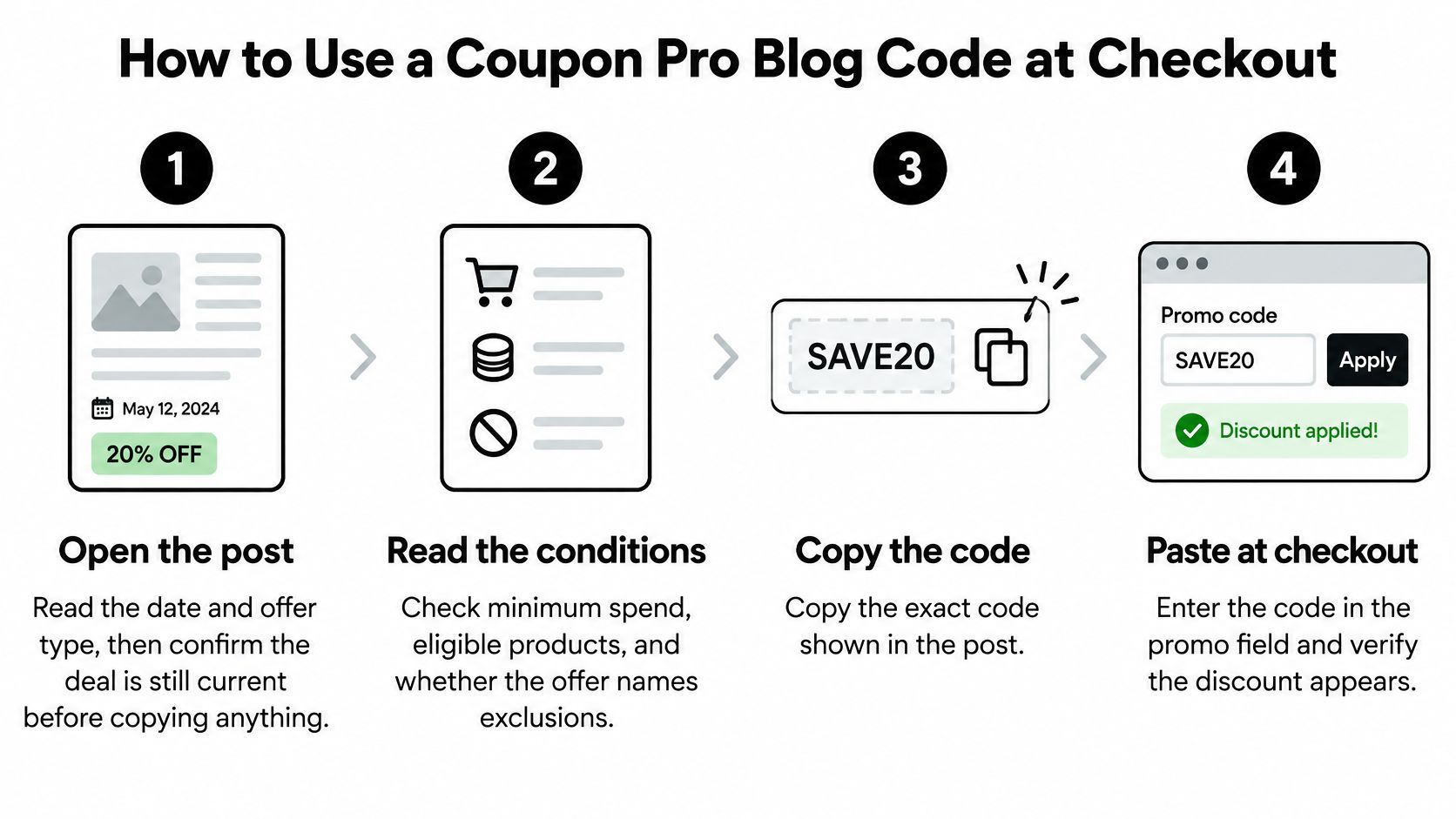
Follow the offer, not just the code
Open the post and inspect the date and offer type. Establish whether you're looking at a checkout code, a clipped coupon, a sale price, or a free-sample request. These aren't interchangeable, and searching for a promo field won't help when the offer requires a different action.
Read the conditions before building your cart. Look for minimum spend, eligible products, exclusions, and any named country or currency. A promotion intended for another storefront may not apply to the store region you're using.
Copy the code exactly as displayed. Preserve its letters, numbers, and symbols, and avoid adding spaces when pasting. Don't assume capitalization matters at every store, but reproducing the original text removes an avoidable source of uncertainty.
Add eligible items before applying the code. Match the product, size, variant, and purchase method described in the post. If a promotion requires a subscription, compare that commitment with a one-time purchase rather than judging the offer solely by its advertised saving.
Apply the code and inspect the order summary. Confirm that a discount line appears and the total changes before you authorize payment. Compare the delivered cost, including shipping and taxes, rather than assuming a successful code guarantees the best purchase.
If checkout rejects it, save the exact message. Note the code, relevant cart contents, and store region so you can diagnose the problem instead of trying similar-looking combinations. The wording can help distinguish a missing offer from an ineligible basket.
A code appearing in the promo field isn't proof that the store applied it.
Confirm the result before paying
Success means the discount appears in the order summary, the total falls by the expected amount, and the qualifying product price matches the post's conditions. If the final amount differs, resolve that discrepancy before payment rather than hoping the merchant will adjust it afterward.
The video below provides an additional walkthrough.
Why Public Codes Fail and What to Do Next
Shopify distinguishes between an inactive or nonexistent code, which produces “Enter a valid discount code,” and an existing code that doesn't apply to the cart, which produces an item-eligibility error, according to its discount-code documentation. Merchants can configure validity dates, usage limits, minimum spend, eligible merchandise, customer eligibility, and discount combinations.
That distinction matters. An eligibility error calls for checking the basket, not hunting for different spellings of the same promotion.
Why a public code fails and the next move
| Failure | Shopper check | Next move |
|---|---|---|
| Expired offer | Compare the end date in the post with today's date | Look for a newer post or skip the code |
| Mistyped or altered code | Recopy the code from the original post and check capitals | Enter it once more exactly as written |
| Cart not eligible | Check the minimum spend and product rules | Add eligible items or remove conflicting discounts |
| Market or currency limit | Check whether the offer names your country or currency | Use an offer for your market or buy from the right store region |
| Customer-restricted code | Check whether the post limits the code to employees, influencers, or partners | Don't use it; the merchant can restrict it to selected customers |
| Already used or capped | Check whether the code is single-use or has a usage limit | Find a current public offer or ask the store about a replacement |
Distinguish a restriction from a mistake
A public listing doesn't turn a restricted promotion into a public entitlement. If the offer originated with an employee or partner campaign, consult the terms for exclusive discount codes rather than assuming visibility means permission.
Payment state can also complicate usage limits. Shopify's discount FAQ explains that a code is held against its usage limit during payment processing, but that hold is released if payment is declined. A failed payment therefore doesn't necessarily mean a limited-use offer has been permanently consumed.
Merchants may end campaigns or change eligibility after a publisher shares them. Shoppers shouldn't interpret every rejection as an input error, and merchants shouldn't automatically honor a restricted code because someone found it online.
Stop guessing: If two codes fail for the same reason, diagnose that condition or leave the purchase undiscounted. Repeated attempts don't change eligibility.
How Public Codes Distort Affiliate Commissions
Say a customer selects a product, adds it to the cart, and opens checkout. A browser extension then appears, applies a coupon, and introduces an affiliate referral that receives commission under the merchant's attribution rules. The shopper gets a saving, but the merchant hasn't established that the affiliate created the purchase.
A coupon-assisted sale isn't automatically an incremental referral. An affiliate may introduce a customer, persuade an undecided shopper, or appear at the end of a purchase already underway. Those contributions shouldn't be treated as equivalent without investigation.
Browser-extension activity is one reason merchants should inspect the checkout timeline.
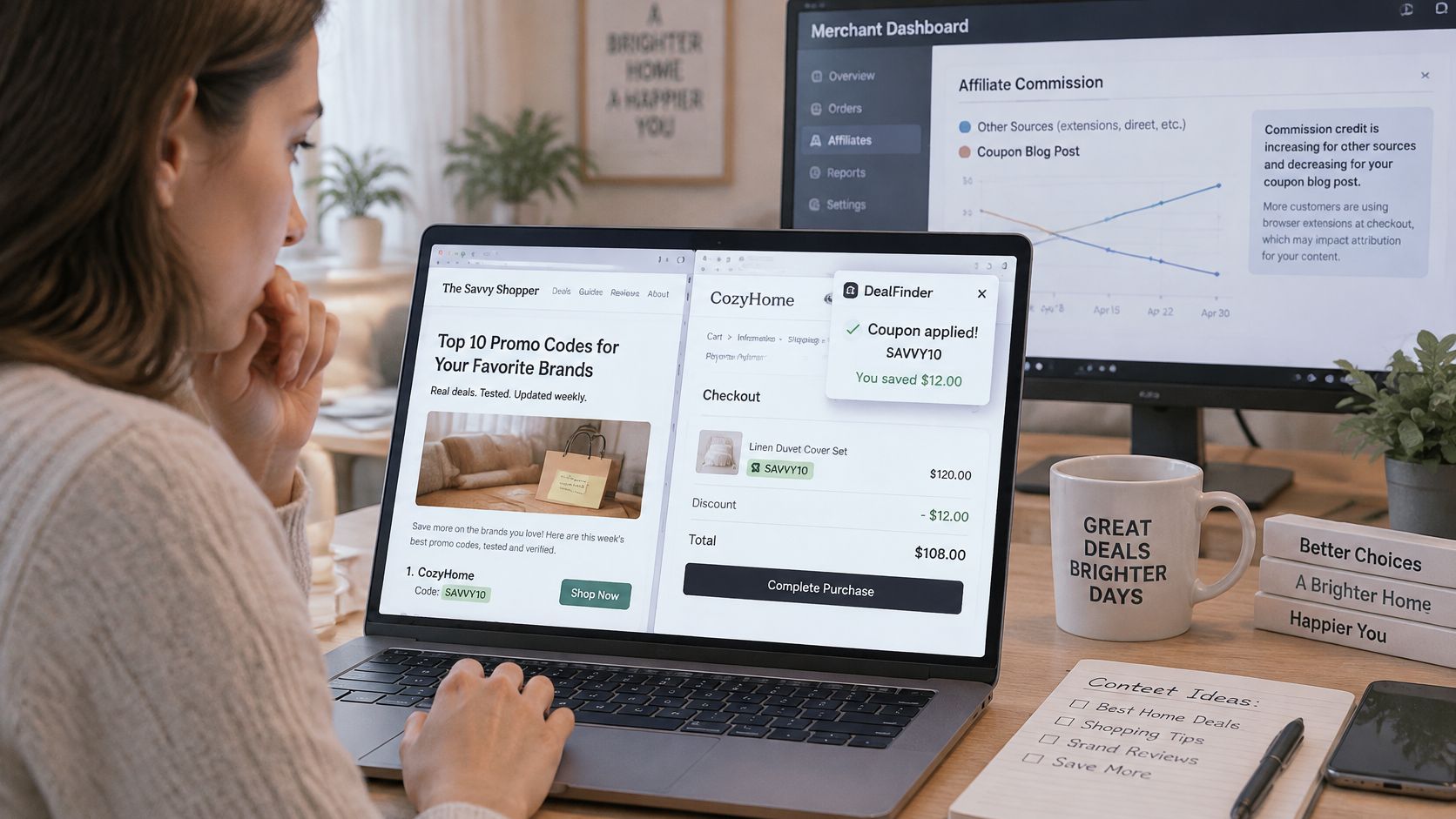
Ask who influenced the purchase
Compare affiliate events with cart creation, checkout initiation, and order completion. Keep the investigation focused on observable behavior:
- Checkout timing: Was the customer already entering checkout before the extension or affiliate appeared?
- Purchase contribution: Did the offer help introduce or persuade the customer, or did it merely attach a commission to existing intent?
- Referral sequence: Did the affiliate click happen before product discovery or after the customer had already committed items to a basket?
These questions identify orders worth reviewing, not automatic proof of abuse. A shopper can need a discount to complete an existing cart, and a short referral path can still represent useful assistance.
Measure contribution separately from last-touch credit
Review click-to-order latency, the share of affiliate orders using coupon codes, and the percentage of conversions where the affiliate was the final touch. Short latency alone doesn't establish misconduct, but combined with checkout timing and restricted-code use, it can expose patterns that aggregate revenue reports conceal.
The policy context also matters: Syntaqx's acquisition and attribution guidance describes Chrome Web Store changes announced in March 2025, enforced from June 10, 2025, restricting affiliate-link modification without disclosure, user action, and a direct user benefit. Those requirements don't replace a merchant's own assessment of referral value.
Report orders in separate cohorts: already in checkout before the affiliate touch and newly referred before checkout, with uncertain paths labeled separately. Compare commission cost and discount cost within each group. This gives program managers a better basis for partner discussions than crediting every last-touch coupon conversion as newly acquired demand.
What to Record Before a Code Goes Public
Treat an outside deal publication as a distribution channel beyond your owned audience, not as a checkout-control system. Once a code appears publicly, you need a record that explains its intended use independently of whatever description accompanies a repost.
A coupon's dictionary definition describes the discount instrument, not the complete eligibility policy. Merchants must supply that policy through configured rules and a campaign record.
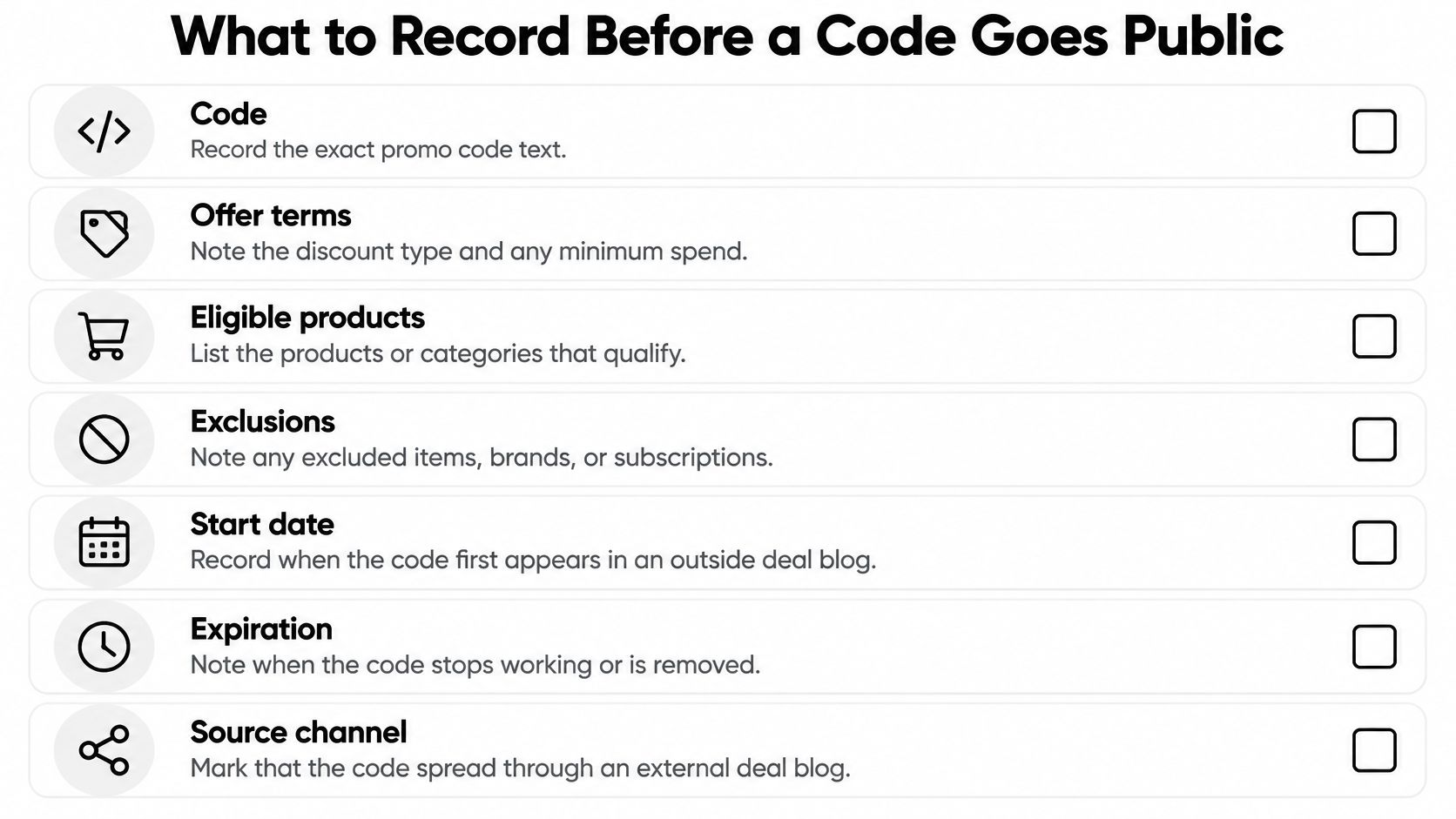
Build a record someone else can enforce
- Exact code and intended audience: Save the literal text and identify whether it's public, employee-only, influencer-linked, or partner-restricted.
- Start and expiry: Record when the promotion begins and when redemption should stop, including the relevant store time zone.
- Offer and minimum spend: Specify the discount type, qualifying subtotal, and exclusions so support staff don't need to reconstruct the campaign.
- Eligible products: List qualifying products, collections, variants, and purchase types.
- Markets and currencies: Record where the offer applies and how the discount should behave locally.
- Affiliate attribution: Identify the intended partner and the applicable commission treatment.
- Publication locations and closure check: Log outside listings and assign someone to verify the code after the campaign ends.
Currency deserves explicit attention. Shopify's Markets guidance states that percentage discounts apply to local prices, while fixed-amount discounts originate in the store's default currency and convert at checkout; merchants can also assign discounts to specific markets. A fixed-value offer can therefore display a different local-currency saving without being incorrectly configured.
After closure, test that the offer no longer works for its former eligible audience and retain the URLs where it appeared. Check store settings as well as public listings, because removing a post doesn't deactivate a code.
A recorded audience and expiry make a leaked code easier to investigate and restrict. Without those details, staff are left debating whether unexpected use was authorized.
Check Your Codes Before the Next Deal Goes Live
Before publishing, sharing, or reusing a code, verify its audience, expiry, market, and attribution, and record where it has appeared. That decision protects both sides of the transaction: shoppers can assess the actual offer, and merchants can distinguish intended promotion from unwanted exposure.
For shoppers, the immediate task is modest. Confirm the date and eligibility before copying the code, then judge the purchase by the final price. Don't add unnecessary merchandise just to make a promotion apply.
Match the response to the exposure
For Shopify merchants, an outside listing should trigger a review, not an automatic shutdown. A deliberately public promotion belongs on deal-discovery channels. A restricted employee or partner code requires a different response, especially if its redemption settings don't enforce the intended audience.
At KeepCart, we scan coupon sites and forums around the clock to detect leaked codes. When we detect a leak, we automatically contact the coupon site on the store's behalf to request removal. Full coupon extension blocking, leak detection, and automated takedowns are included on every Shopify plan, not only Shopify Plus.
A removal request isn't a substitute for correcting the store's discount settings. Decide whether the merchant should restrict or deactivate the exposed code while the request is handled, and preserve legitimate customer access where the campaign still requires it.
Put an owner on the next review
- Review every active code and its settings. Separate intentional public promotions from restricted campaigns and investigate any rule that doesn't match its purpose.
- Record the audience and expiry for each code. Assign a campaign owner who can decide whether unexpected exposure requires action.
- Turn on leak monitoring and review the report after each campaign closes. Check publication locations alongside redemption status so old listings don't leave an active discount unnoticed.
KeepCart offers Shopify merchants coupon extension blocking, leaked-code monitoring, and automated removal requests to help control how public offers spread and get used. Visit KeepCart to protect your next campaign and identify restricted codes that have reached outside deal sites.
Written with the Outrank tool