Coupon Extensions Explained: How They Find and Apply Codes
Learn how coupon extensions find and apply codes at checkout, why they can take affiliate credit, and how to control them.
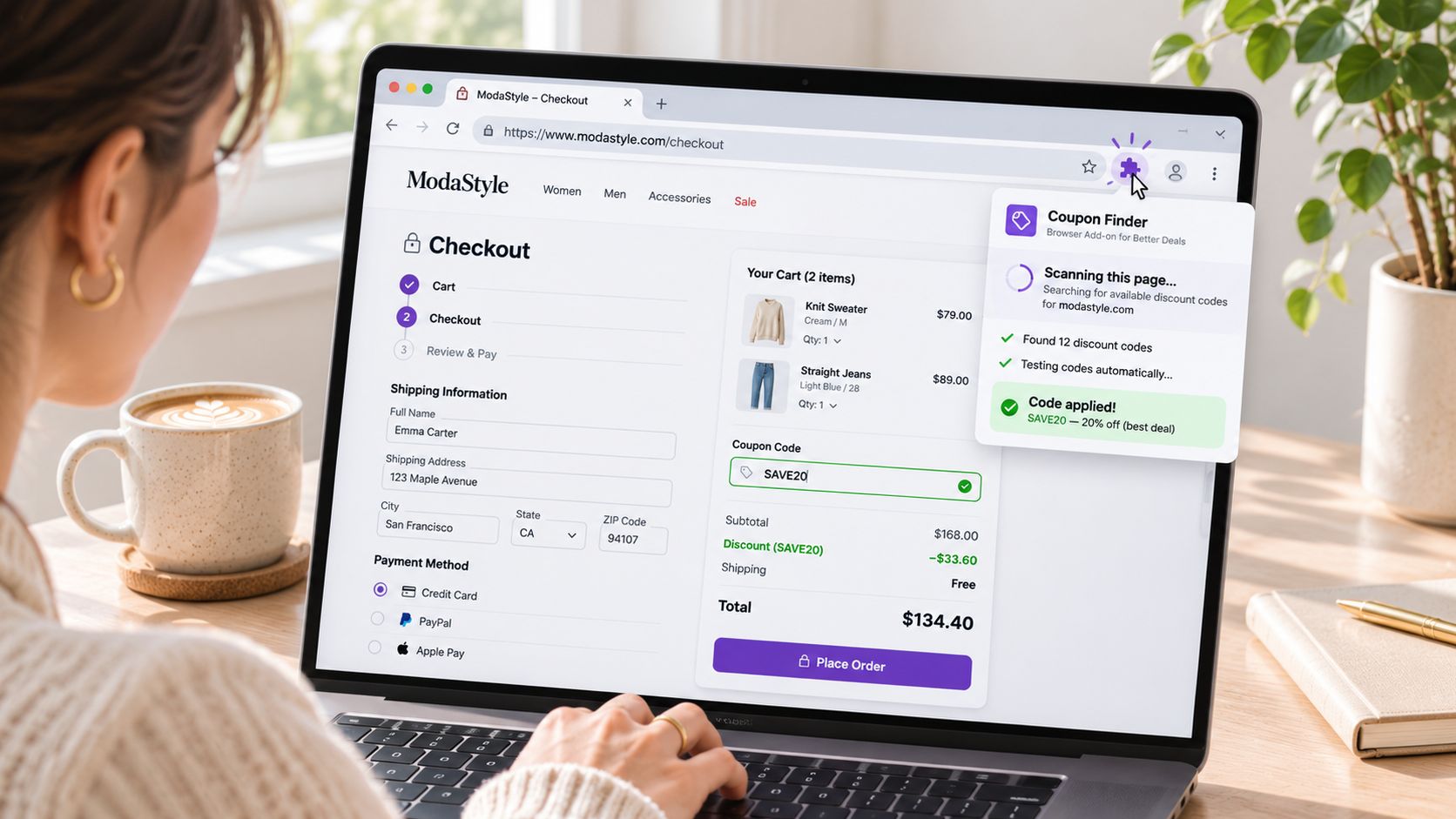
It takes about four seconds. A shopper adds three items, reaches checkout, and pauses. A small icon in the browser toolbar lights up, a code drops into the discount field, and the order total falls. The shopper pays and moves on.
Your dashboard later shows an ordinary order with a code attached. Maybe it's one you published. Maybe it's a code you gave a partner and never meant for this shopper. Maybe it's a code you never issued at all, pulled from a database neither of you can name.
Somewhere between the cart and the paid order, a piece of software made a pricing decision about your store. That gap is where the actual subject lives, and it's far more interesting than the tired argument about whether coupon extensions are good or bad.
This walkthrough treats code validity and code authorization as two separate questions, because they are. It also follows the money past the discount and into affiliate credit, where the sums are larger and the evidence is patchier.
What Coupon Extensions Are and Why They Matter
A coupon extension is a browser add-on that watches shopping pages and attempts discount codes at checkout. It installs into Chrome, Edge, Firefox or Safari, sits in the toolbar, and waits for a page that looks like a payment screen.
Think of it as a helper who walks ahead of you down a corridor of locked doors, carrying a heavy ring of keys, trying each one until a handle turns. The shopper never sees the ring. They see the door swing open.
The category splits into a few recognizable shapes, and most tools blur them together:
- Code finders scan the page, test candidate coupons, and auto-apply the one that cuts the total most.
- Cashback tools track the purchase and pay the shopper a rebate later, funded by the commission the tool collects from the retailer.
- Price trackers watch saved items and email the shopper when the number falls, then nudge them back to the product page.
What unites them is timing. They don't advertise in advance. They act at the moment of purchase, when the cart is full and the decision is nearly made.
Adoption isn't a fringe habit. One published industry estimate from Capital One Shopping's coupon statistics research puts browser-extension use for automated digital coupons at 32% of online shoppers. Treat that as directional. The figure doesn't establish a methodology, sample size, geography, or any split between people who installed an extension once and people who use one at checkout.
Why the number still matters: if even a third of your buyers carry a tool that can rewrite a discount field, coupon control is a checkout governance problem, not a customer-service annoyance you handle when someone complains.
The same direction shows up in cashback data. In 2024, 27% of U.S. consumers surveyed by Wildfire Systems and Big Village said they used cashback browser extensions more than in the previous year.
So the question isn't whether extensions exist or whether your customers have them. It's what happens once one reaches your cart.
How a Coupon Extension Finds and Applies a Code
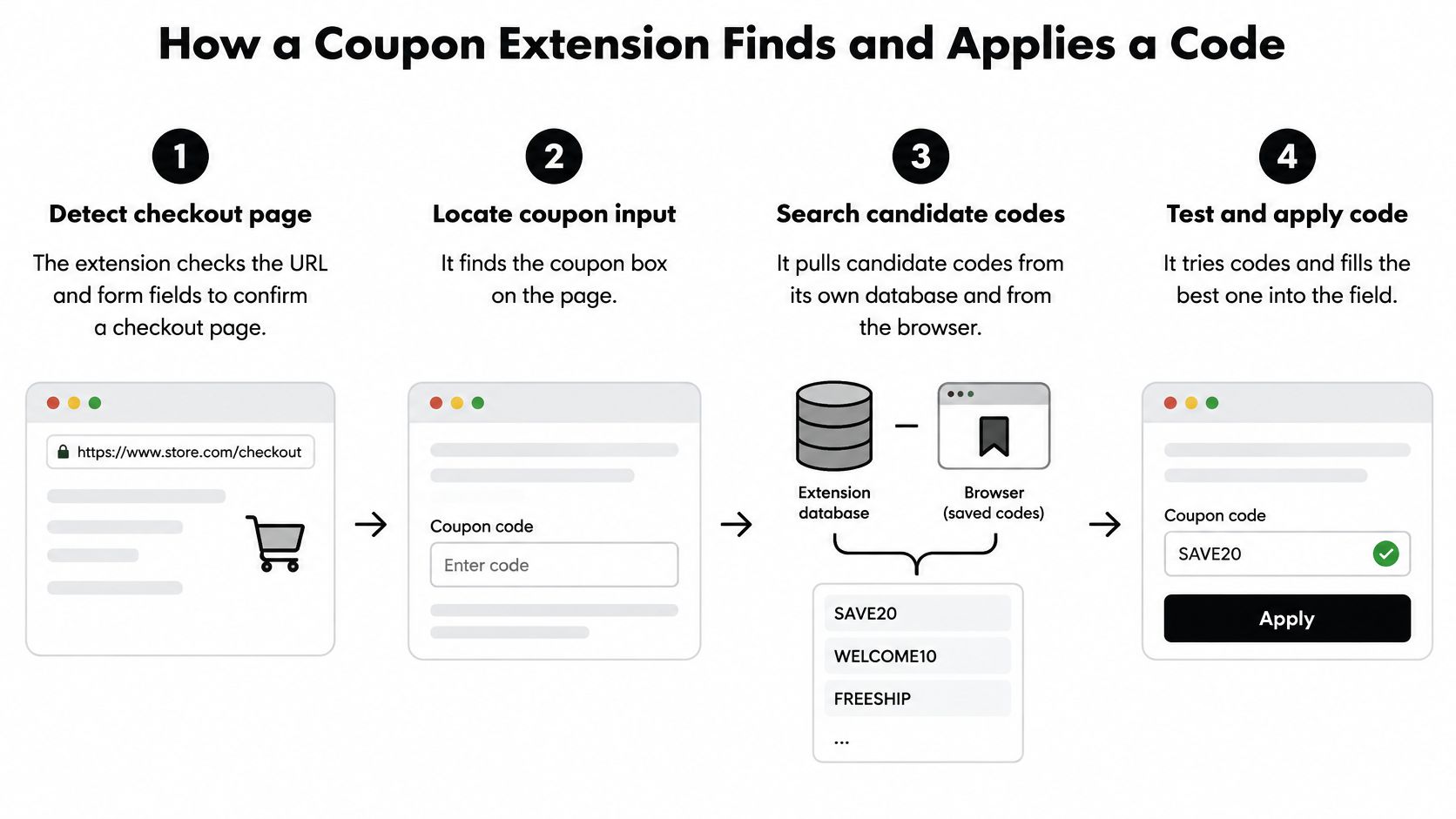
The mechanics run in a fixed-ish sequence, though exact behavior differs by vendor, browser and store. Here is the generalized model, stage by stage, with the merchant-side consequence attached to each one.
- Detect the checkout page. The extension reads the URL and the page structure, looking for a promo field, a visible order total and a payment button. Your checkout template is doing double duty as a signal, and any page that resembles payment becomes a target.
- Locate the coupon input. It finds the discount box by matching page elements. If the field exists, it can be filled. Hiding it behind a link slows the tool down for about a second, nothing more.
- Assemble candidate codes. It pulls from its own database, from coupon pages the shopper visited, and from offers the browser has already seen. A code you issued to one partner can surface on a stranger's order.
- Test the codes in sequence. Each code gets submitted, your validation runs, and the new total is compared to the old one. Your checkout absorbs a burst of live requests against your own discount rules.
- Keep whichever code lowers the total most. The winner may be your deepest offer, an expired campaign nobody closed, or a code restricted to a customer group this shopper was never part of.
- Apply the code and touch tracking. This is the stage where affiliate cookies get written or refreshed. A discount and a commission can move in the same second.
- Record the referral. The network registers whoever was last in the chain as the reason the sale happened.
Why the order of application matters
Stacking can increase the total discount. On Shopify, customers can apply up to five product or order discount codes plus one shipping discount code to the same order, according to Shopify's documentation on discount combinations. Product discounts apply first, order discounts land on the resulting subtotal, and shipping discounts come last. Shopify also states that the five-code limit includes codes delivered through shareable discount links.
That ordering creates a specific exploit path. A leaked code can shrink the subtotal before shipping incentives are calculated, and an extension testing codes in sequence can fill the available slots with whatever combination your rules permit.
Where to intervene: detection, testing, discount math and attribution all happen inside this sequence. Nothing downstream can undo a code that was already accepted.
Where Extension Codes Come From and What They Can Access
Nobody hands an extension your price list. It assembles one, piece by piece, from places you may not be watching.
Where the codes come from
- Public coupon sites and forums, scraped or crowdsourced, where a code lives long after the campaign ended.
- Deal newsletters that forward an offer to thousands of inboxes the day it launches.
- Influencer and partner codes shared beyond the audience they were written for, sometimes deliberately, often casually.
- Old campaign codes that were never deactivated because nobody owned the cleanup.
- Customer-submitted codes typed into a browser panel by shoppers who think they're being helpful.
A leak usually starts small. One creator posts a code in a story. A scraper picks it up. Within days the string is sitting in an extension database attached to your domain, and it will keep working until something in your own rules stops it.
What the extension can actually see
Here's the part merchants underestimate. To do its job, a coupon tool requests permission to read and change data on the sites you visit, plus access to cookies, web navigation and network requests. With those rights granted, it can spot a checkout page, read the coupon field, fill it, and rewrite tracking cookies. The shopper notices none of it.
The permission model is broader than the use case. Independent research summarized in SimplyCodes' comparison of coupon extension privacy practices found that roughly 50% of the products reviewed monitored URLs inappropriately, with some able to inspect shopping-related query strings, fill forms, intercept data bound for competitors, or report activity from pages protected by HTTPS.
Run one example through it. A shopper clicks a competitor's comparison link, lands on your product page, adds to cart. At checkout the extension applies an influencer code from a different campaign. The code is real. It's live. It was meant for an audience this shopper doesn't belong to, and the commission that follows belongs to a partner who never made the introduction.
That is the distinction worth building your process around. A valid code is one your system accepts. An authorized code is one this customer was supposed to use. Most stores only measure the first.
How Affiliate Credit Gets Reassigned at Checkout
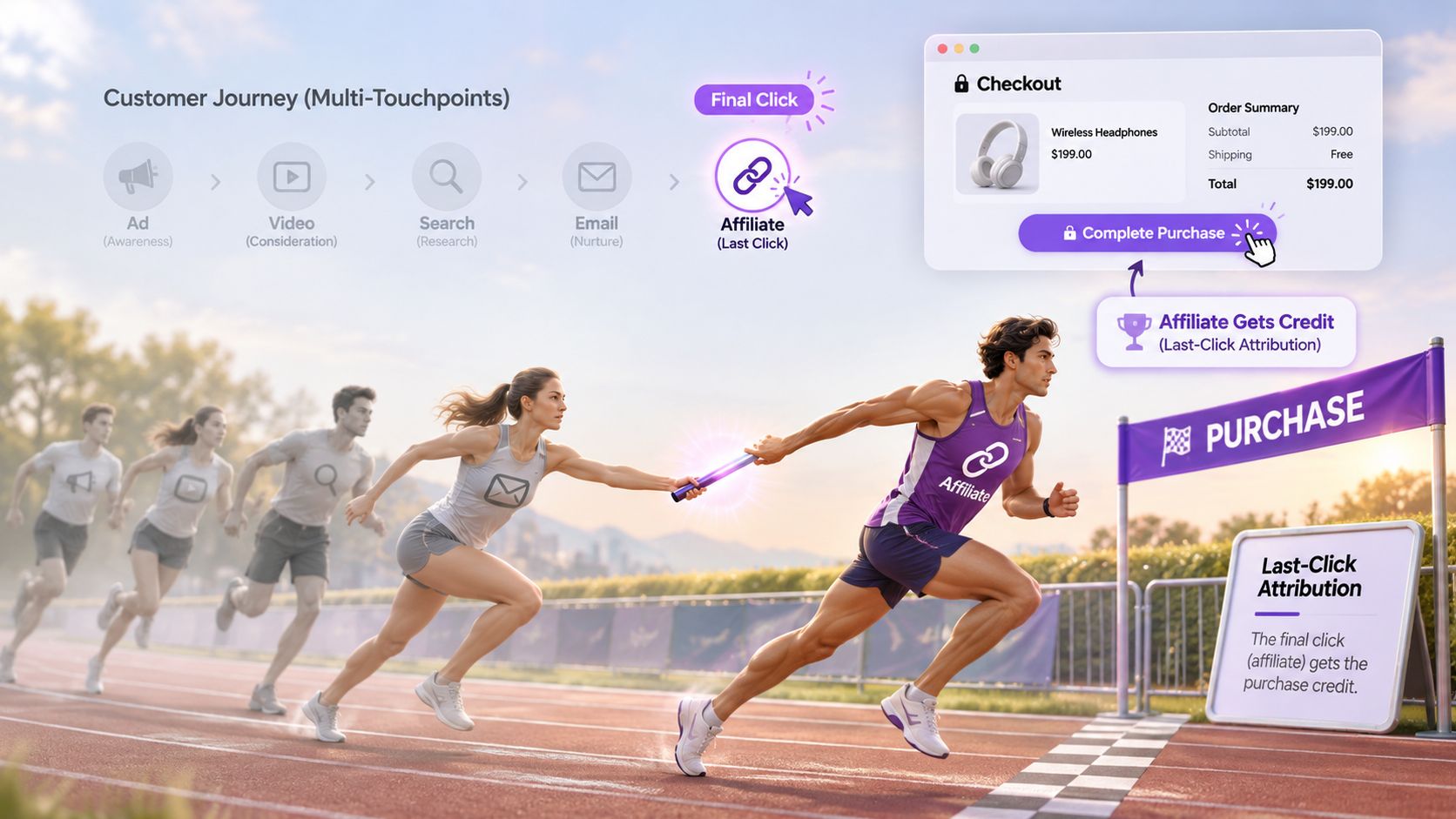
A relay hands the baton through four runners, and the crowd remembers the anchor who crossed the line. The first three legs made the finish possible, but the applause lands on the last touch.
That is last-click attribution. The final affiliate cookie before purchase collects the commission, regardless of who introduced the customer, wrote the review, or paid for the ad that started the journey.
The Honey case, briefly
The public argument over this has a landmark. PayPal acquired Honey, and later allegations circulated that the extension could alter affiliate attribution at checkout, including in cases where no discount was ultimately applied. Independent testing reported by Snopes on the Honey browser extension allegations found that using the extension changed the affiliate cookie to identify PayPal as the recipient of the commission, while reporting cited there put Honey's user base at about 20 million before the allegations and roughly 17 million after.
Google has since tightened Chrome Web Store rules around affiliate-code disclosure and around extensions claiming commissions when no discount reaches the shopper.
Three separate systems collided in that episode: discount authorization, affiliate attribution, and platform governance. A code can pass your checkout validation and still fail the harder question of whether this shopper was meant to use it.
Four ways to assign credit
| Model | Who gets credit | Blind spot |
|---|---|---|
| Last-click | Final affiliate cookie before purchase | Credits the closer while missing the creator who drove the visit |
| First-click | First tracked touchpoint | Ignores every decision made later in the journey |
| Assisted conversion | Every tracked touchpoint shares credit | Hard to split value cleanly between partners |
| Holdout test | Buyers with and without the extension are compared | Needs controlled traffic and time to read |
Each model answers a different question. Last-click tells you who was present at the end. A holdout tells you whether the presence changed anything.
The valid-versus-authorized split becomes an attribution problem, not only a margin problem. Validity lives in your discount database. Authorization lives in the relationship: the creator audience, the partner campaign, the channel that earned the introduction. An extension can satisfy the first and violate the second in the same checkout.
Watch the chain mechanically. A shopper arrives through a paid review or an influencer post. At checkout, an extension injects a live code found elsewhere, rewrites the last affiliate cookie, and collects credit for a referral it never made. Your store still gets the order. The margin still leaks if the code was outside your plan. The difference is that the partner report now tells a false story about who caused the sale.
If exclusive influencer discount codes are part of your program, attribution is where the leak shows up first. A code tied to a specific creator, applied to a shopper who arrived from somewhere else entirely, hands commission to a partner who earned none of it and teaches your best creators that the program does not pay.
Whether Extensions Create Sales or Just Take Credit
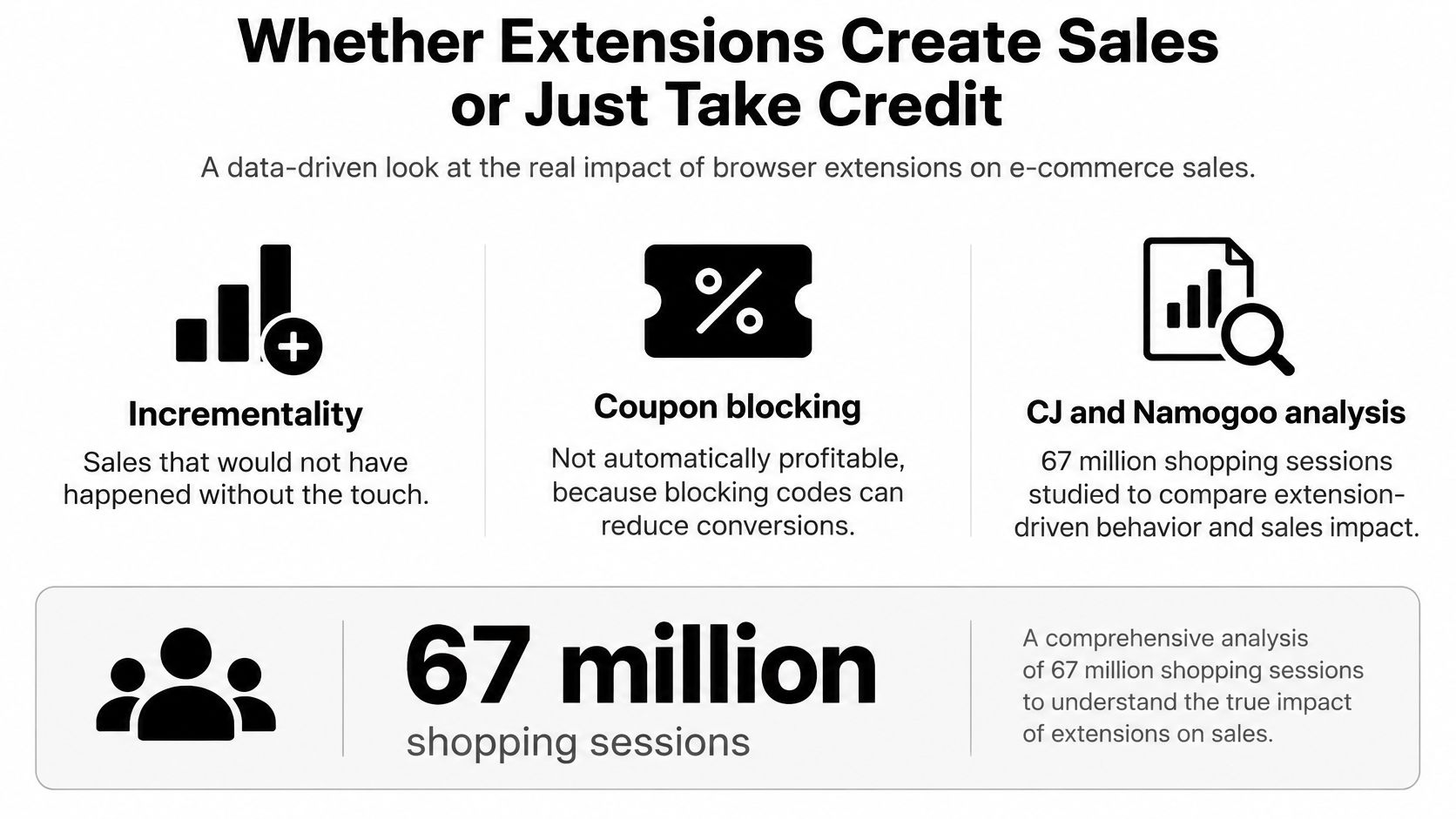
The instinct is that blocking extensions recovers margin. A CJ and Namogoo analysis of 67 million shopping occasions complicates that instinct in a way worth sitting with. According to CJ's study of shopping browser extensions, exposure to a proactive pre-checkout extension message increased add-to-cart rates by 38% and conversion rates by 64%, corresponding to 65% more revenue per session.
The sharper number: shoppers who saw a message without receiving any discount were still 25% more likely to purchase. The nudge did work that the discount didn't.
Meanwhile, across extension users the average discount rose by only 0.5 percentage points, while pre-checkout messages produced a larger 2.2% discount increase that was offset by additional revenue added to the cart.
The paradox in plain terms
Suppress the extension and you may remove two things at once: an unauthorized discount injection and a purchase prompt that was pushing people over the line. Kill one, lose the other.
Retailers see the second half of this everywhere. In 2024, 93% of surveyed U.S. consumers said they were more likely to complete a purchase after finding a deal through a browser extension, according to Wildfire Systems' consumer survey reported by Retail Today.
So blocking has to be evaluated as an offer-routing decision, not only as a discount-control decision. That changes what you measure.
How to run the test properly
Split traffic by extension exposure and hold it long enough to read. Then slice the results by market, channel, code type and customer segment, because a blanket number hides the cases that matter.
Track four things before you decide anything:
- Conversion rate by exposure group, so you can see whether the prompt or the discount was doing the work.
- Revenue per session, since a smaller discount on a larger basket can beat a deeper discount on a small one.
- Discount rate as a percentage of gross sales, not a count of redemptions.
- Contribution margin after discount and after commission, which is the only number that reflects both levers moving together.
The question that keeps coming back is how to separate legitimate incremental conversions from buyers who were always going to purchase. PMG's analysis of browser extensions and attribution models frames it as the gap nobody has cleanly closed: a shopper may have decided to buy before opening a coupon tool, and the tool still ends up credited.
One more layer. Replacing a blocked code with a merchant-controlled offer preserves margin per order, but substitution still moves conversion rate, average order value and the customer's experience of your pricing. A controlled holdout beats judging success from coupon-redemption counts alone.
How to Spot Extension Activity in Your Order Data
You don't need new tooling to start. Five signals live in the order export you already have.
- Codes you never issued. Compare every code on every order against the list of codes your team published. Anything outside that list is a finding, and the count is usually higher than merchants expect.
- Clusters on one code. Many orders using the same string from a single referral source inside a short window suggests a leak spreading through extension databases rather than an organic promotion.
- Mismatch between referral and discount. An influencer code attached to an order that arrived from a comparison site or a coupon page is misattributed credit, and it's the most expensive signal on this list.
- Codes stacked near the ceiling. Orders carrying several codes at once deserve a look, because automated testing adds codes in sequence until one sticks.
- A sudden jump in discount rate. Track discount rate weekly by code and by channel. A step change with no campaign behind it is a leak, a reissued code, or a partner gone rogue.
None of these proves extension use on its own. Each marks an order worth opening.
The record that separates valid from authorized is dull and indispensable: a log of which code was issued to which partner, for which audience, on which link, for how long. Without it, every disputed commission becomes an argument about memory. With it, you can show that a code was live, restricted, and used by somebody outside its group.
Practical rule: if you can't answer "who was this code for" in under a minute, you don't have coupon protection, you have coupon guessing.
The output of this exercise is short: a list of suspect codes and suspect channels. That list feeds the holdout test and the controls review, which is where the next section goes. A deeper walkthrough of discount code leak detection covers the monitoring side if you want to automate the scan.
Lock Down Your Codes and Run the Store Audit
Start with the rule that outranks every tool: a leaked code keeps working until its rules change. Not until you notice. Not until you email the coupon site. Until the rules change.
Shopify gives you the levers. Per Shopify's documentation on discount codes, a merchant can configure validity dates, usage limits, minimum order amounts, product or collection restrictions, and discount-combination rules, and can impose a total usage cap or limit a code to one use per customer. The platform also caps a store at 20,000,000 unique discount codes, after which existing codes must be deleted before new ones can be created.
Set the rules before you go hunting, because a code with no expiry is a code that never dies.
| Control | What it limits | When it helps |
|---|---|---|
| Validity dates | Use outside a set time window | A code leaks after a campaign has ended |
| Usage limits | Total redemptions and one use per customer | A widely shared code is redeemed at scale |
| Minimum order amount | Smallest eligible cart | Small-cart abuse of a broad offer |
| Product or collection restrictions | Which items a code can discount | Partner codes meant for one range |
| Combination rules | Up to five product or order codes plus one shipping code | Stacked codes from extensions or shareable links |
| Automatic discount limit | Maximum of 25 active automatic discounts, including app-based ones | Capacity planning when many offers run at once |
Two of those rows carry quiet consequences. Shopify's guide to automatic discounts sets the ceiling at 25 active automatic discounts per store, including app-based ones, and notes that for an automatic promotion to work the shopper must add every qualifying item to the cart, both the trigger item and any promotional item received. That's useful for defense: an injected offer fails when the required products aren't there.
The other consequence is targeting. Shopify's overview of discount methods separates manually entered codes from automatic discounts, and lets codes target specific customers, products, variants or collections with restricted use counts. Those restrictions are excellent for employee, influencer and partner promotions. They do nothing to stop a code being copied and pasted somewhere else, which is why restrictions limit the blast radius after a leak rather than preventing one.
The audit, in order
- List every active code and its owner. One row per code, one name attached. Orphaned codes are the ones that leak.
- Flag anything posted publicly or shared with partners. These carry the highest exposure and deserve the tightest rules.
- Set a validity date and a usage cap on every code, including the ones you think are internal.
- Restrict partner and influencer codes to their designated links so the code alone stops being enough to redeem it.
- Run the holdout from the previous section before you decide anything, so you're choosing with numbers rather than instinct.
- Block, replace or allow, then re-measure in four weeks.
That fourth step is where link-level control pays off. If a creator's code only works through the creator's own protected links, the code can circulate as widely as it likes without paying commission to whoever grabbed it last.
This is the job KeepCart was built for on Shopify. It blocks more than 120 coupon extensions, including Honey, RetailMeNot, Karma and Capital One Shopping, before they reach checkout, so only the codes you approved arrive there and nothing gets auto-applied. Extension blocking, leak detection and automated takedowns are included on every Shopify plan, Plus or not.
The next order that lands with a code you never issued is a data point, not a disaster. KeepCart stops more than 120 coupon extensions before checkout, keeps unauthorized codes from being auto-applied, and swaps a blocked or expired code for a valid one you control so the sale still completes. Visit KeepCart to see how extension blocking, leak detection and Protected Links work together on your store.